You can edit the list of Paid By values that appear in the drop-down list for the Cheque # / Paid By field for donations, by using the Maintenance ⇒ Donation Paid By Values menu option. (However, you can type anything into that field that you want - this list is just some defaults that you can more easily select.)
The most common uses of this feature will probably be to add a Paid By value that your organization uses that isn't on the default list, or to delete some values that you don't use, in order to make the list shorter.
The Maintenance ⇒ Donation Paid By Values menu option brings up the following window:
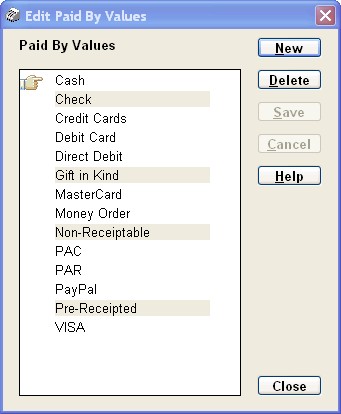
You will notice that some of the values are greyed out - they cannot be edited or deleted. That's because they are values that are used for special purposes in the program, as follows:
•Check (for US users) or Cheque (for Canadian and other users): This is used to identify cheques, if you don't choose to actually type the cheque number into the Cheque # / Paid By field. Some reports total donations by the Paid By value, and those reports group together any donations with actual cheque numbers in the Cheque # / Paid By field, with ones with the value "Check" or "Cheque", into one total under the name "Check" or "Cheque".
•Gift in Kind: Identifies Gifts in Kind, that have special treatment in DONATION for Canadian users.
•Non-Receiptable and Pre-Receipted: Using either of these values marks a donation as non-receiptable, so it will never be included in an official receipt generated with the Receipt menu options.
To edit the name of an existing Paid By value on this window, just click into it, make your desired change, and click Save. (You can't edit the ones listed above.)
To add a new value, click New, type in the new value, then click Save. To delete a value (other than the ones listed above), click on it, then click Delete.
To cancel a change (an edit of an existing value, or a new value) that you have started but not yet saved, click Cancel.
To close this window, click Close.
Please note that unlike editing Donor or Donation Categories, changing the name of a Paid By value does not change the value in any existing donations using that value. And deleting a Paid By value that has been used in existing donations is allowed.
Also, in the Donations tab of the Maintenance ⇒ Main Window Options window, you can set a Default Paid By value. The program does not force you to have any value that you choose to set there be a value that is on this window, but you would probably want it to be on this window. If it is on this window and you change its name here, it will not change in the Main Window Options window - you would have to also change it there.
Changes if you Configure Bank Deposits
If you configure bank deposits with the Maintenance ⇒ Configure Bank Deposits menu option, this window gets changed to add a column for "Include in Bank Deposit", as follows:
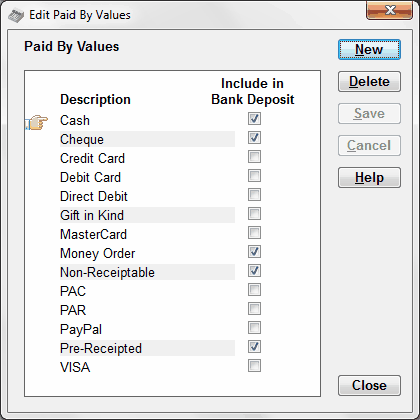
That allows you to specify which of the Paid By Values indicate that a donation can be included in a bank deposit, and which indicate that it will never be included in a bank deposit.
It's important to remember that the values on this window are just the contents of the Cheque # / Paid By drop-down list when you are entering or editing donations, but you can always enter any other value into that field as well (such as actual cheque numbers). Any value that is not on this list is assumed to be a potential part of a bank deposit. (So, if you want to make sure that a Paid By value is excluded from bank deposits, it must be on this list, with the "Include in Bank Deposit" checkbox unchecked.)
This topic was last edited on Mar 23, 2023