The Database ⇒ Copy Missing Donors menu option allows you to copy all or one missing donors, donation categories, and donor categories from one specified year, and any intervening years, to another specified year.
How to Use this Window
Choosing that menu option brings up the following window:
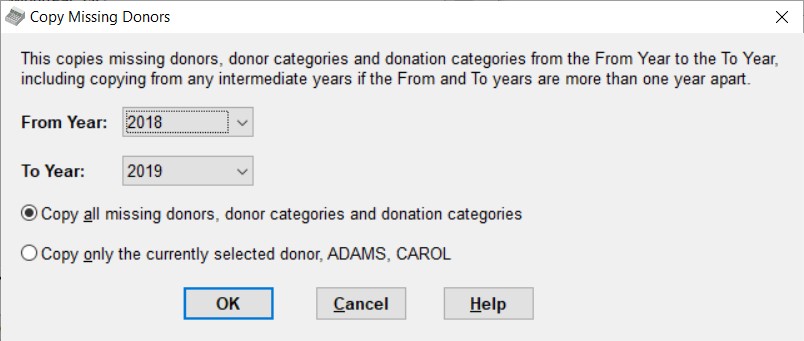
To use this window, select your desired From and To years from the drop-down lists of all years of data currently in the database. They can be one or more years apart.
Then you can choose between the two radio buttons, for copying all missing data (donors, donor categories and donation categories) or only the currently selected donor (and any donor categories it has) in the current year.
If you click on the 2nd radio button, "Copy only the currently selected donor ...", the From Year is automatically set to the current working year in the program, and becomes disabled so you cannot change it. If you see that the currently selected donor on the main window, and whose name is shown in the text of this radio button, is not the donor you want, just Cancel this window, select your desired donor, and come back to this window. If you aren't in the year from which you want to copy a given donor, change years first with the Maintenance ⇒ Change Year menu option.
Then once you are happy with your selected years and the radio button choice, click OK, and follow the prompts. For most common uses the From Year will be less than the To Year, but you can also use it with the From Year greater than the To Year.
Why you Might Need This Window
When you first start working on a new year by using the Maintenance ⇒ Change Year menu option, it copies all donors and categories from the current year to the new year you have selected. It also optionally skips copying donors that have not donated in the last 2 years, which you may later decide was a mistake. Also, subsequent times that you switch to that year, it does not copy any further donors or categories.
So, suppose you've been working on 2019, and on January 1, 2020, you switch to 2020 for the first time. All donors and categories from 2019 (that you have entered so far!) will be copied to 2020. Now, suppose you notice a few late donations that you still need to enter for 2019, and they are for new donors. You switch back to 2019, and enter those donations and donors. Then, switch back to 2020. The new donors aren't in 2020! That's what this feature is most commonly used for, to copy those missing donors, in this example from 2019 to 2020. In this case, when you were in the 2020 year, you would use Database ⇒ Copy Missing Donors, using the From Year 2019 and To Year 2020 to fix things up.
Of course, it is possible to just re-enter the missing donors manually. This is a bad idea for two reasons. First, it's extra typing, and error-prone! More importantly, if you enter a donor manually in two different years, and then do a report that compares donations between the two years by donor (such as. Reports ⇒ Donor ⇒ Donation Info ⇒ Sort by Name or any of the other reports on that sub-menu), it won't correctly match up the donations for that donor for the two years.
Another situation where missing donors can be an issue to also related to changing the year for the first time. When you do that, and it prepares to copy from the previous year, it asks you whether to skip copying donors that don't have donations within the last two years. If you answer Yes to that (a reasonable choice), some donors will be skipped. If you later do get some donations from those donors, you would want to bring those donors forward by using this new option. (Of course, doing so makes it as if you answered No to that question.) For individual donors where this comes up, it would make sense to choose the "Copy only the currently selected donor ..." radio button to fix this, after switching back to the previous year and selecting that donor.
A similar case for using the "Copy only the currently selected donor ..." radio button would be if you had copied all of the donors from one year to another, then you believed a given donor would no longer be donating in the new year so you deleted them there . Then you do get another donation from them in the new year!
When is a Donor "the Same" Between Two Years?
It's important to understand what the program's definition is of a "missing" donor or category. Contrary to what you might expect, it is not based on the name of the donor or the Member/Envelope # for donors, or the name of the category for categories! Basing it on such data would be too error prone. You might have entered the same person in two different years with slightly different spellings, or you might genuinely have two different John Smiths, or you might have assigned the same Member/Envelope # to a different donor in a different year. So using any of those fields would cause errors if those were the elements linking donors.
Rather, the rule really is that if a donor or category didn't get into a given year (either the one you're copying from, or the one you're copying to) by being copied in the first place by the program, it is considered to be missing. ("Copied by the program" includes being copied by the Change Year routines, or by the Copy Missing Data routine.) This has some interesting side-effects, however. Suppose you did hand-enter a new donor record for John Smith in two different years. If you then use this routine, you will end up with two copies of John Smith in the year you are copying to!
It's also important to understand that the program only copies entire missing donors. It does not update changed addresses or other information for existing donors! Addresses that have been updated in one year and are needed to be correct in another year can be fixed with the Database ⇒ Copy Addresses menu option. Other changes that you need in multiple years after copying to a new year has been completed must be done by hand, if it is important to you that previous year's records for the donors also have the same changes.
If you use Copy Missing Donors and then find that you have duplicate donors in one of the years, because you had already re-created the same donor manually in the year you were copying to, you can use the Database ⇒ Merge Duplicate Donors menu option to fix that, by deleting the duplicate.
The program also watches out for this process creating duplicate Member/Envelope Numbers, which isn't supposed to be allowed, and tells you how to find them and fix them if they are found.
Copying Between Multiple Years
Copying Forward: If your From year is more than one year before the To year, DONATION will copy from the most recent data first.
So for instance if you copy From 2018 To 2020, the sequence of copies will be:
1.Copy missing donors etc. from 2019 to 2020
2.Copy any remaining missing donors etc. from 2018 to 2020
There is never any copying done to years in between the From and To Years.
Note: In releases prior to 4.14, the copying forward was done in the opposite order, first from the From year to the To year, then moving forward, which we realized was not ideal because it tended to get out of date data into the To year.
Copying Backward: If your From year is more than one year after the To year, DONATION will again copy from the most recent data first. So for instance if you copy From 2020 To 2018, the sequence of copies will be:
3.Copy missing donors etc. from 2020 to 2018
4.Copy any remaining missing donors etc. from 2019 to 2018
There is never any copying done to years in between the From and To Years. (Copying in this backward direction is not frequently needed!)
If you are copying a single donor (by checking the radio button for copy the "Currently selected donor") it will still try to do this multiple year copying. If the donor isn't present in any of the years between the From Year (which must be your current working year) and the To Year, there will be messages saying that it wasn't found in those years. but that is not a problem.
Multi-Year Reports and Copying Missing Donors
Prior to version 3.42 of DONATION, all of the multi-year reports on the Reports ⇒ Donor ⇒ Donation Info sub-menu had a weakness, in that they only showed donors that were present in the current year. So if there was a donor with donations in the prior year(s) that had not been copied to the current year, it would not show up on any of those reports, and thus the total donations figures for the prior year(s) at the bottom of the report would not actually be correct. (The same weakness applied to Reports ⇒ Donor ⇒ Old Donors - it only showed donors present in the current year, who had not donated in the past 2 years, but had in prior years.)
This weakness was another reason for using Database ⇒ Copy Missing Donors, to make those reports complete.
Starting in version 3.42, however, all of those reports have been fixed to include all donors in all relevant prior years, whether or not they have been copied to the current year. (The relevant prior years are the current and previous year for all but one of the reports mentioned above, and the current and prior three years for Reports ⇒ Donor ⇒ Donation Info ⇒ Last 4 Years. As a result, their totals for all years will now be correct, and Database ⇒ Copy Missing Donors is no longer required to fix them.
However, this is not the case when you do multi-year report, for over 2 years, with the Reports ⇒ Custom Reports menu option. While a report for 2 years will automatically include any donors in the earlier year which are missing in the later year, reports for over 2 years only include donors that are present in the last of those years. If you want to be sure to have all donors in all of those years included (including ones you might have deleted in later years), you could first use Copy Missing Donors to copy all of the donors forward from the first of the years, and all intervening years, to the last of those years. In fact, the program will prompt you about whether you wish to do that, if there are missing donors in the last year, when you run such reports, and if you answer Yes, it will do so automatically without you having to go to that menu option.
Pledges and Copying Missing Donors
If you use pledges, there are some further details you should understand about what happens when you copy missing donors.
What happens exactly depends on what you have selected in the Pledges tab of the Maintenance ⇒ Main Window Options window. (Note: If you have turned off the display of the Annual Pledge field on the Donor Details tab of that window, no pledge information will be copied, because the assumption is that you aren't using pledges.)
If you select the pledging type "Simple Annual Pledge", you will be asked whether or not to copy the Annual Pledge amounts.
If you select the type "Annual with Start Date and Category", you will be asked whether or not to copy the pledge data. If you answer Yes, pledge start dates in the donor records copied to the other year will be set to be January 1st of that other year.
If you select the type "Multi-Year", no question will be asked. Any multi-year pledges whose range of years includes the year that you are copying to will be copied over, with exactly the same details as they had in the year you are copying from.
Cleaning up after a Temporary Copy Missing Donors
Suppose you do a Copy Missing Donors from a few years back, to the current year, in order to do some specific reporting, like a list of the addresses or donations for all donors in the last 5 years. But after that, you don't want your current year's database cluttered up with many donors from past years who have never donated.
You could use Reports ⇒ Donor ⇒ Non Donors in that case to find all donors in the current year's list that have never donated, with the number of years each one has been in your current database, and then consider manually deleting ones that have been around for a while and never donated, or that you know have died, lost interest in your organization, or whatever.
Another helpful report for this purpose is Reports ⇒ Donor ⇒ Old Donors, which lists donors that are present in this year or last year's list of donors that have not donated in either year, but did donate in previous years, with the date of their last donation and the total amount they have ever given.
Yet another option is to make a database backup before the copying, do the copying and any needed reporting (but no other data entry!), then carefully restore that database backup you made.
This topic was last edited on Jan 30, 2024