This section explains how to create, and when to use, duplicate and corrected receipts. (Duplicate receipts are also called "replacement" receipts, particular for Canada.) While the same menu options are used to generate them, they are significantly different in concept. The two menu options that can generate individual duplicate or corrected receipts are Receipt ⇒ Current Donor Duplicate/Corrected and Receipt ⇒ Duplicate/Corrected by Number. Both options are mostly used when a donor has already received an original receipt, and you need to send them a new one.
One other menu option that is related is the Receipt ⇒ Reprint Range menu option. That is for use when there is no correction to be made, or the only corrections are ones you have already made to the donor's information (such as their name or address), rather than to donation information. Reprint Range does also handle some changes to donation information (deleting donations included in the receipt). Reprint Range can be used when the donor(s) have not received the original receipt(s), and you just need to reprint them so you can send them to the donor(s) for the first time. But it can also be used to reprint receipts marked as being Duplicate or Replacement or Corrected, if the donor(s) have already received the original receipt(s), and you need to mark them that way.
Another related option is Receipt ⇒ Delete Range. If you have printed the receipts, but not sent them to the donors, and you realize that they are all wrong in some way, you can delete them from the database (without deleting the donations that were included in those receipts!) with that menu option. After deleting the receipts, and making whatever corrections are required, you can then re-create them normally, without having to use the instructions in this help topic, for instance by using Receipt ⇒ All Donors.
Note: If you have moved on to a new year, and need to create a corrected or duplicate receipt for the previous year, you will first have to switch back to that year with the Maintenance ⇒ Change Year menu option. When you are done working on your receipts (and anything else you need to do in the previous year), you can go back to the current year with Maintenance ⇒ Change Year again. See Changing Years in the Database if you need more information on this.
A duplicate (or replacement) receipt is one where the donation information has not changed, and you just need to reprint a receipt because the donor informs you that they lost the original that you sent to them. It will have "Duplicate Receipt" printed on it, to help make sure that the donor doesn't use both receipts, if they do find the original. If all you need is a duplicate receipt, you can skip reading the next section on correcting receipts. (However, for users in Canada it is more complex - see Replacement or Correction Receipts for Canada below for details.)
If you have set a Receipt Password, entering it is required to use any of these menu options for correcting or reprinting receipts. You can do that by entering it when the program starts up (if you have also set a Program Entry password), or when you these Receipt menu options that require it.
Gift in Kind Receipts for Canada
Canadian users have distinct receipt formats for regular and Gift in Kind receipts. Replacements or corrections of regular receipts are done with Receipt ⇒ Current Donor Duplicate/Corrected or Receipt ⇒ Duplicate/Corrected by Number, while Gift in Kind receipts can be replaced or corrected with Receipt ⇒ Gift in Kind Receipts ⇒ Current Donor Duplicate/Corrected or Receipt ⇒ Gift in Kind Receipts ⇒ Duplicate/Corrected by Number.
Correcting Receipts - Simplest Case
This section covers the case where all that needs to be corrected is one or more of the fields of a donation included in the receipt - usually the donation date, amount(s) or category.
First just find the donor and the donation included in that receipt on the program's main window. Click on any field in the receipted donation row that you want to correct, so that the hand pointer at the left points at it. Then click the Correct button in the row of buttons above the donations, and follow the prompts.
That's all you have to do in that case. For a few more details, see Editing a Donation.
Note: If you change a donation to be non-receiptable, you will be asked to confirm that change, and if you confirm it, the donation will be removed from the receipt.
For Canadian users, you cannot use the Correct button's window to change a donation from being for a Gift in Kind to not being so, or vice versa, or from being for a donation with Advantage or not being so, because each of those types of receipt are different. (That window will stop you from doing so, if you try!) Use the method in the next section below instead.
Correcting Receipts - More Complex Cases
This section covers what to do if there is more wrong with the donation information in a receipt, and you need to correct it. Possible problems include:
•A donation needs to be deleted (for instance, because the cheque came back NSF)
•A donation needs to be added, because you missed it originally.
•For Canadian users, you need to switch a donation between being for a Gift in Kind and not, or between a donation with Advantage or not.
Here are the steps you need to use to make such corrections:
1.Be sure to note the receipt number of the receipt you are correcting first, if you do not have a printed copy of it in front of you. It will show in the Recpt # field in the Donation Details area of your main window.
2.If any donation included in the receipt just needs to be deleted (for example because it was NSF), you do so by clicking the mouse into any field on that donation's row (which will move the pointing hand at the left to point to that row), then click the Delete button above those rows of donations (to the right of the Batch Entry button). You will have to confirm the delete by pressing OK on two successive message boxes.
3.If you then need to re-enter a donation you deleted in step (2) because it needed to be corrected, just enter it normally on the blank donation line on the main window, then click Save to save it. You will not be able to enter the Recpt # field - it gets filled in later when you actually create the receipt.
4.If you need to enter any donation that was missed out from the receipt originally, add it as in the previous step.
Now you are ready to actually create the corrected receipt, which will normally have the words "Corrected Receipt" added to it (or more complex wording for Canada).
Note: You cannot correct receipted donations on the Batch Entry window - it will not even retrieve previously entered donations that already have a Recpt #.
Creating your Duplicate or Corrected Receipt
For the Receipt ⇒ Current Donor Duplicate/Corrected option, you must first click into the row of a donation on the main window that is part of the receipt for which you want to create a duplicate or corrected version (has that receipt number in its Recpt # field). Its receipt number will be used.
Alternatively, you can use the Receipt ⇒ Duplicate/Corrected by Number option, in which case you enter the desired receipt number in the options window that comes up.
In either case, the following window then comes up:
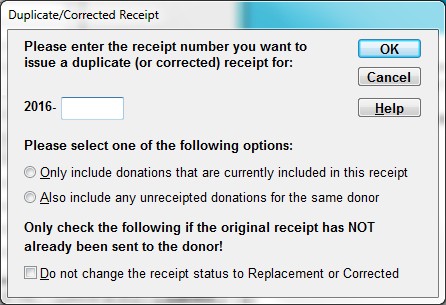
If you used Receipt ⇒ Current Donor Duplicate/Corrected, the receipt number to the right of the year will already be filled in, with the receipt number of the donation you clicked on, and it will not be editable. Otherwise, you fill that number in yourself.
This window normally has two radio button options, of which you must select one:
•Only include donations that are currently included in this receipt. You would use this option if you were creating a duplicate receipt, or for instance if you just had to delete one of the donations in a receipt because it was paid by a cheque that came back NSF, and you need to create a corrected receipt with that donation omitted.
•Also include any unreceipted donations for the same donor. You would use this if you added any donations that should be included, either as corrections or simple additions. You could also use this option if you wanted to merge later donations (or missed donations) into a receipt issued earlier, but we would advise caution in using it this way, because it could cause confusion for the donor, if they had already received the original receipt. (Instead, you could just issue a new receipt containing only the added donation or donations.)
However, if the receipt being corrected is already known to be a Gift in Kind, because you used Receipt ⇒ Gift in Kind Receipts ⇒ Current Donor Duplicate/Corrected, the radio buttons in described above are actually omitted from this window. You cannot add further donations to a receipt for a Gift in Kind, because each such donation has to have its own receipt, to be able to show the description of the gift.
When you use Receipt ⇒ Duplicate/Corrected by Number or Receipt ⇒ Gift in Kind Receipts ⇒ Duplicate/Corrected by Number, if the receipt number you enter is either a Gift in Kind or a receipt with Advantage, you are only allowed to select "Only include donations that are currently included in this receipt", again because such receipts must be for only one donation.
Finally, there is the Do not change the receipt status to Duplicate or Corrected checkbox. As the text above it in the window says, you should only check this checkbox if the original receipt has not been sent to the donor. (If they have already received the original receipt, to avoid confusion and/or double submission of receipts on the donor's tax form, this new receipt must be marked Duplicate or Corrected, as appropriate.) If you do check this checkbox, you are also asked a further question to confirm that you haven't sent the original receipt to the donor, when you click OK.
Note: even if you check "Do not change the receipt status to Duplicate or Corrected", if the program notices that either new donations have been added to the receipt (because you checked "Also include any unreceipted donations for the same donor"), or the total amount has changed for any other reason, the receipt will still have its amounts corrected, but it will not be changed to say that it is Corrected.
Click OK to display the duplicate or corrected receipt, and then you can use the Print or Email/Print button to print it or email it to the donor.
The following sections give some further details on duplicate and correct receipts.
Duplicate Receipts
A duplicate receipt (also called replacement receipt) is if the donor has merely lost the receipt, and there is nothing wrong with it. You should not just send them a photocopy of their original receipt, because an unscrupulous donor could submit both to the government. Instead, use the above options to generate a duplicate receipt. It will have the words "Duplicate Receipt" added to it (or more complex wording for Canada). For non-Canadian receipts, the duplicate will have the same receipt number as the original. See Replacement or Correction Receipts for Canada below for details of what happens for Canada.
However, if the donor definitely never received the original receipt (for example if you didn't send it), you can avoid the replacement being marked as a duplicate by either checking Do not change the receipt status to Duplicate or Corrected, or instead using the Receipt ⇒ Reprint Range menu option, which normally does not change the status of the receipt to Duplicate if it is not already marked as a Duplicate, and the amounts have not changed. Of course, if you have a printed copy of the original, you could just send them a photocopy!
Corrected Receipts
One unusual situation is if only one donation was included in the receipt, the cheque came back NSF, and you can't get the donor to replace the cheque. In that case, you must use the Receipt ⇒ Duplicate/Corrected by Number option to create the receipt (because there is no remaining donation to click on!). The corrected receipt will show the amount of $0. Make sure that if the donor received the original receipt, they also get this corrected receipt, even if it is for $0, so that they know not to use the original.
When you do delete a donation for which a receipt has already been issued, there is actually inconsistent data in the database until you issue the corrected receipt. If you generate Reports ⇒ Receipt ⇒ All Receipts, it will still show the original incorrect amount for this receipt. As soon as you issue the corrected receipt, this is fixed. There is also a report for finding such problems, where the total of donations currently associated with a given receipt does not match the original total for the receipt. That report is Reports ⇒ Receipt ⇒ Incorrect Receipts.
We should also note here that the option Receipt ⇒ Reprint Range does not normally create duplicate or corrected receipts (unless the ones being reprinted are already marked as being duplicates or corrected, or you choose the options to mark the reprinted receipts as "Corrected" or "Duplicate"). It can be used to reprint original receipts, and should be used when the original print did not work, as for instance when there was a paper jam or your printer ran out of ink. However, if a donation included in a receipt has been deleted, and thus it needs to be corrected, the Reprint Range menu option is smart enough to correct the receipt for you and mark it as a "Corrected Receipt". Reprinted receipts (rather than duplicate/corrected) can also be used when a receipt has been previously generated, but never sent to the donor.
Replacement or Correction Receipts for Canada
The Canada Revenue Agency (CRA) wants replacement receipts (whether they are a correction or not) to have a new receipt number, with a reference back to the old receipt number that they are replacing. The old receipt is to be retained, and marked "Cancelled".
To accommodate this, starting in version 3.64 of DONATION, any action that creates a replacement or corrected receipt, including Receipt ⇒ Current Donor Duplicate/Corrected, Receipt ⇒ Duplicate/Corrected by Number, and Receipt ⇒ Reprint Range, depending on the options chosen on the windows for those menu options, will do this. A new receipt will be created, and all donations included in that receipt will be moved from the old receipt number to the new receipt number. The old receipt will still exist, but will now have no attached donations, a total amount of $0, and a type indicating that it is cancelled.
Of course, a new receipt number is not created if you check "Do not change the receipt status to Duplicate or Corrected", because that assumes the original receipt was never sent to the donor, and thus no real correction or replacement is happening.
The receipt type printed on built-in receipts (or the «ReceiptType» mail-merge field for mail-merge receipts) now has much longer text than it does for non-Canadian receipts (which say either nothing for original receipts, or "DUPLICATE RECEIPT" or "CORRECTED RECEIPTS"). Examples of what this text can say include "This receipt is CANCELLED - it has been replaced by No. YYYY-NNNNN" for a receipt that has been replaced, and "This receipt cancels and replaces the original No. YYYY-NNNNN" for its replacement. (Similar wording is used for corrected and correction receipts, with additional wording about it being corrected as well as replaced.) Of course, receipts for Quebec will use appropriate corresponding French or bilingual wording.
The original receipt, now marked cancelled, should be printed out and kept with your records, replacing the original one you had on file. The new receipt should be sent to the donor. When you are emailing receipts, replaced or corrected receipts (the old ones, marked "Cancelled") will never be emailed, but always printed for your records.
Any duplicate or corrected receipts created with versions of DONATION prior to 3.64 will still show the old wording, that is also used on non-Canadian receipts.
When an individual receipt is being corrected or replaced, and the new and old receipts are displayed, the new one will appear first, to avoid confusion. (Prior to version 3,70, the old one, with the total amount of $0, appeared first, which led many users to think something was wrong, if they didn't notice the other receipt lower down!)
This topic was last edited on Feb 22, 2024