Some churches that use envelope numbers like to reassign / renumber them annually or periodically. The Database ⇒ Reassign Envelope Numbers menu option can be used for this purpose. This would often be used on a new year's donors, after using the Maintenance ⇒ Change Year menu option to create a new year.
You can also assign the next higher envelope number after all existing ones, or the lowest unused envelope number, to an individual donor. See here for details.
After selecting the Database ⇒ Reassign Envelope Numbers menu option, the Reassign Envelope Numbers window appears, as follows:
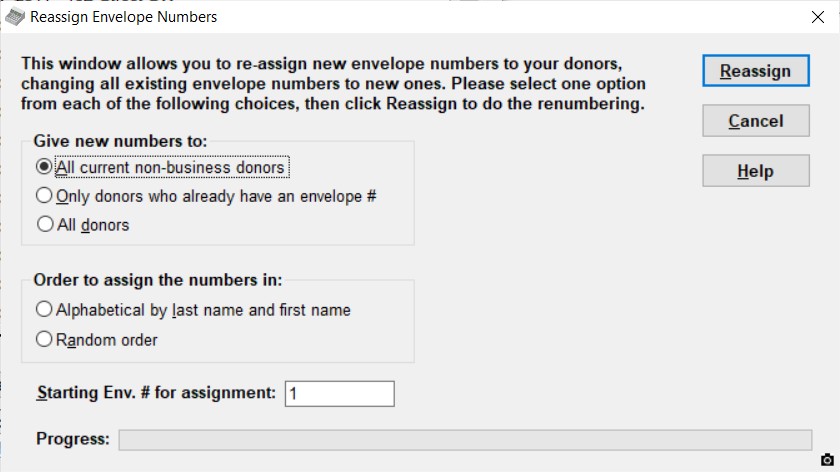
On this, you have to make two choices and one entry:
1.Give new numbers to: This is one of "All current non-business donors", "Only donors who already have an envelope #", or "All donors".
"All current non-business donors": This option gives a new envelope number to every donor in your database, except for businesses (because presumably they don't attend church and make weekly donations with envelopes!). If any businesses do have envelope numbers, those numbers are removed. Businesses are considered to be those donors whose Business Name is filled in.
"Only donors who already have an envelope #": This option only renumbers the envelope numbers of all donors that currently have envelope numbers. If you currently have donors with envelope numbers that you want to be excluded, so that they don't get envelope numbers, you will need to manually remove them by editing those donors first to remove the contents of the Member/Envelope # field, and then use this option.
"All donors": This option gives a new envelope number to every single donor, whether or not they are a business, and whether or not they already have an envelope number.
2.Order to assign the numbers in: You can select either "Alphabetical by last name and first name" or "Random order".
3.Starting Env. # for assignment: This is where to start the renumbering at. This will be initialized to be the same as the "Lowest Member/Env. # for automatic assignment" option on the Donor tab of the Maintenance ⇒ Main Window Options window, and in fact changing the number here also changes it on the Main Window Options window.
Once you have made these selections, click the Reassign button.
The program will then first confirm that you have made a backup of your database recently. This is important, in case you do the reassignment, and then decide it was not what you wanted, or you did it on the wrong year's data, or something. If you have made a backup, do the renumber, and aren't satisfied with the results, just restore that backup (with Backup/Restore ⇒ Restore Database) to be back to where you were before the backup.
The program then asks you to confirm that that this is what you want to do, telling you how many donor's envelope numbers will be affected. When it is done, it tells you whether or not it was successful.
Progress on the updating of the database is shown on the progress bar at the bottom of the window.
Tips and Tricks
Probably the easiest way to use this option is either near the year end, or shortly into a new year, after you have used Maintenance ⇒ Change Year to move into the new year's data for the first time. When you use this option, only the donor's envelope numbers for the year you are working in are changed. If you change back to the previous year with Maintenance ⇒ Change Year, the donors in that year will still have their old envelope numbers. It is not a problem for the same donor to have different envelope numbers in different years.
If you need to do the renumbering for the coming year a month or two before the year end, because you need to re-order new envelopes and want to know how many you will need, you can first switch to the next year, do the Reassignment, review the results, then switch back to the current year. When you pass the year end and are ready to start entering donations for the new year, you should use the Database ⇒ Copy Missing Data option to copy any donors added during those last couple of months from the current year's donor list to the new year's donor list. However, that only copies (as it says) missing donors - any address changes etc. will have to be re-done manually in the year in which they were not originally done.
Warning re: Reassigning Envelope Numbers and Importing Donations
If you are using the Database ⇒ Import ⇒ Donations menu option to regularly import recurring donations, they are matched to the correct donor by the envelope number, which is in the first column of the file you import. If you have reassigned your envelope numbers, you need to edit that file to give the new correct numbers to each donor in that file!
The same would apply if you are using the Database ⇒ Import ⇒ PAR Donations menu option, because those are also matched by envelope number. In that case, you would have to inform PAR of the new envelope numbers for the donors, so that they can make those corrections before sending you the next data file for importing.
This topic was last edited on Dec 4, 2024